


注意
跳转到末尾 下载完整的示例代码。
简介 || 张量 || 自动微分 || 构建模型 || TensorBoard 支持 || 训练模型 || 模型理解
PyTorch 入门#
创建于:2021年11月30日 | 最后更新:2025年6月5日 | 最后验证:2024年11月5日
请观看下面的视频或在 youtube 上观看。
PyTorch 张量#
请观看视频中从 03:50 开始的部分。
首先,我们将导入 PyTorch。
import torch
让我们看看一些基本的张量操作。首先,介绍几种创建张量的方法。
z = torch.zeros(5, 3)
print(z)
print(z.dtype)
tensor([[0., 0., 0.],
        [0., 0., 0.],
        [0., 0., 0.],
        [0., 0., 0.],
        [0., 0., 0.]])
torch.float32
上面,我们创建了一个 5x3 的全零矩阵,并查询了其数据类型,发现这些零是 32 位浮点数,这是 PyTorch 的默认类型。
如果你想要整数怎么办?你可以随时覆盖默认值。
i = torch.ones((5, 3), dtype=torch.int16)
print(i)
tensor([[1, 1, 1],
        [1, 1, 1],
        [1, 1, 1],
        [1, 1, 1],
        [1, 1, 1]], dtype=torch.int16)
你可以看到,当我们改变默认值时,张量在打印时会很友好地报告这一点。
通常,我们会随机初始化学习权重,并经常设置一个特定的 PRNG 种子以保证结果的可复现性。
torch.manual_seed(1729)
r1 = torch.rand(2, 2)
print('A random tensor:')
print(r1)

r2 = torch.rand(2, 2)
print('\nA different random tensor:')
print(r2) # new values

torch.manual_seed(1729)
r3 = torch.rand(2, 2)
print('\nShould match r1:')
print(r3) # repeats values of r1 because of re-seed
A random tensor:
tensor([[0.3126, 0.3791],
        [0.3087, 0.0736]])

A different random tensor:
tensor([[0.4216, 0.0691],
        [0.2332, 0.4047]])

Should match r1:
tensor([[0.3126, 0.3791],
        [0.3087, 0.0736]])
PyTorch 张量进行算术运算非常直观。形状相似的张量可以相加、相乘等。与标量的运算会分散到整个张量中。
ones = torch.ones(2, 3)
print(ones)

twos = torch.ones(2, 3) * 2 # every element is multiplied by 2
print(twos)

threes = ones + twos       # addition allowed because shapes are similar
print(threes)              # tensors are added element-wise
print(threes.shape)        # this has the same dimensions as input tensors

r1 = torch.rand(2, 3)
r2 = torch.rand(3, 2)
# uncomment this line to get a runtime error
# r3 = r1 + r2
tensor([[1., 1., 1.],
        [1., 1., 1.]])
tensor([[2., 2., 2.],
        [2., 2., 2.]])
tensor([[3., 3., 3.],
        [3., 3., 3.]])
torch.Size([2, 3])
这里是可用数学运算的一个小样本。
r = (torch.rand(2, 2) - 0.5) * 2 # values between -1 and 1
print('A random matrix, r:')
print(r)

# Common mathematical operations are supported:
print('\nAbsolute value of r:')
print(torch.abs(r))

# ...as are trigonometric functions:
print('\nInverse sine of r:')
print(torch.asin(r))

# ...and linear algebra operations like determinant and singular value decomposition
print('\nDeterminant of r:')
print(torch.det(r))
print('\nSingular value decomposition of r:')
print(torch.svd(r))

# ...and statistical and aggregate operations:
print('\nAverage and standard deviation of r:')
print(torch.std_mean(r))
print('\nMaximum value of r:')
print(torch.max(r))
A random matrix, r:
tensor([[ 0.9956, -0.2232],
        [ 0.3858, -0.6593]])

Absolute value of r:
tensor([[0.9956, 0.2232],
        [0.3858, 0.6593]])

Inverse sine of r:
tensor([[ 1.4775, -0.2251],
        [ 0.3961, -0.7199]])

Determinant of r:
tensor(-0.5703)

Singular value decomposition of r:
torch.return_types.svd(
U=tensor([[-0.8353, -0.5497],
        [-0.5497,  0.8353]]),
S=tensor([1.1793, 0.4836]),
V=tensor([[-0.8851, -0.4654],
        [ 0.4654, -0.8851]]))

Average and standard deviation of r:
(tensor(0.7217), tensor(0.1247))

Maximum value of r:
tensor(0.9956)
关于 PyTorch 张量的强大功能还有更多内容需要了解,包括如何设置它们进行 GPU 并行计算——我们将在另一个视频中进行更深入的探讨。
PyTorch 模型#
请观看视频中从 10:00 开始的部分。
让我们来谈谈如何在 PyTorch 中表达模型。
import torch                     # for all things PyTorch
import torch.nn as nn            # for torch.nn.Module, the parent object for PyTorch models
import torch.nn.functional as F  # for the activation function
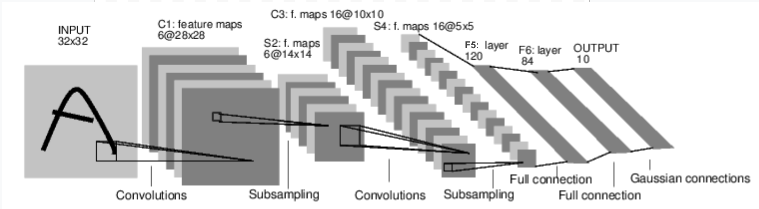
图:LeNet-5
上面是 LeNet-5 的图示,它是最早的卷积神经网络之一,也是深度学习爆炸式发展的驱动力之一。它被构建用于读取手写数字的小图像(MNIST 数据集),并正确地将图像中表示的数字分类。
以下是其工作原理的简化版本。
C1 层是一个卷积层,意味着它会在输入图像中扫描在训练期间学习到的特征。它会输出一个图,显示它在图像中看到每个学习到的特征的位置。这个“激活图”在 S2 层被下采样。
C3 层是另一个卷积层,这次它会扫描 C1 的激活图来寻找特征的 *组合*。它还会输出一个激活图,描述这些特征组合的空间位置,这个图在 S4 层被下采样。
最后,末尾的全连接层 F5、F6 和 OUTPUT 是一个 *分类器*,它接收最终的激活图,并将其分类到代表 10 个数字的 10 个 bin 中。
我们如何在代码中表达这个简单的神经网络?
class LeNet(nn.Module):

    def __init__(self):
        super(LeNet, self).__init__()
        # 1 input image channel (black & white), 6 output channels, 5x5 square convolution
        # kernel
        self.conv1 = nn.Conv2d(1, 6, 5)
        self.conv2 = nn.Conv2d(6, 16, 5)
        # an affine operation: y = Wx + b
        self.fc1 = nn.Linear(16 * 5 * 5, 120)  # 5*5 from image dimension
        self.fc2 = nn.Linear(120, 84)
        self.fc3 = nn.Linear(84, 10)

    def forward(self, x):
        # Max pooling over a (2, 2) window
        x = F.max_pool2d(F.relu(self.conv1(x)), (2, 2))
        # If the size is a square you can only specify a single number
        x = F.max_pool2d(F.relu(self.conv2(x)), 2)
        x = x.view(-1, self.num_flat_features(x))
        x = F.relu(self.fc1(x))
        x = F.relu(self.fc2(x))
        x = self.fc3(x)
        return x

    def num_flat_features(self, x):
        size = x.size()[1:]  # all dimensions except the batch dimension
        num_features = 1
        for s in size:
            num_features *= s
        return num_features
查看上面的代码,你应该能发现与上述图示的一些结构相似之处。
这演示了一个典型 PyTorch 模型的结构。
它继承自
torch.nn.Module——模块可以嵌套——事实上,即使是Conv2d和Linear层类也继承自torch.nn.Module。模型将有一个
__init__()函数,在其中它实例化其层,并加载任何可能需要的 数据工件(例如,NLP 模型可能会加载词汇表)。模型将有一个
forward()函数。这是实际发生计算的地方:输入通过网络层和各种函数生成输出。除此之外,你可以像其他 Python 类一样构建你的模型类,添加任何你需要支持模型计算的属性和方法。
让我们实例化这个对象,并运行一个样本输入。
net = LeNet()
print(net)                         # what does the object tell us about itself?

input = torch.rand(1, 1, 32, 32)   # stand-in for a 32x32 black & white image
print('\nImage batch shape:')
print(input.shape)

output = net(input)                # we don't call forward() directly
print('\nRaw output:')
print(output)
print(output.shape)
LeNet(
  (conv1): Conv2d(1, 6, kernel_size=(5, 5), stride=(1, 1))
  (conv2): Conv2d(6, 16, kernel_size=(5, 5), stride=(1, 1))
  (fc1): Linear(in_features=400, out_features=120, bias=True)
  (fc2): Linear(in_features=120, out_features=84, bias=True)
  (fc3): Linear(in_features=84, out_features=10, bias=True)
)

Image batch shape:
torch.Size([1, 1, 32, 32])

Raw output:
tensor([[ 0.0898,  0.0318,  0.1485,  0.0301, -0.0085, -0.1135, -0.0296,  0.0164,
          0.0039,  0.0616]], grad_fn=<AddmmBackward0>)
torch.Size([1, 10])
上面有几件重要的事情正在发生。
首先,我们实例化 LeNet 类,并打印 net 对象。 torch.nn.Module 的一个子类会报告它创建的层及其形状和参数。如果你想了解模型处理过程的梗概,这可以提供一个方便的概述。
在此下方,我们创建一个代表 32x32 图像(1 个颜色通道)的虚拟输入。通常,你会加载一个图像块并将其转换为此形状的张量。
你可能注意到了我们张量中多了一个维度——*批次维度*。PyTorch 模型假定它们处理的是数据 *批次*——例如,16 个我们的图像块的批次将具有形状 (16, 1, 32, 32)。由于我们只使用一张图像,因此我们创建了一个批次大小为 1 的批次,形状为 (1, 1, 32, 32)。
我们通过像调用函数一样调用模型来请求推理:net(input)。此调用的输出代表模型对输入表示特定数字的置信度。(由于此模型实例尚未学习任何内容,因此我们不应期望在输出中看到任何信号。)查看 output 的形状,我们可以看到它也有一个批次维度,其大小应始终与输入批次维度匹配。如果我们传入一个 16 个实例的输入批次,output 的形状将是 (16, 10)。
数据集和数据加载器#
请观看视频中从 14:00 开始的部分。
下面,我们将演示如何使用 TorchVision 中一个可直接下载的、公开访问的数据集,如何转换图像以供模型使用,以及如何使用 DataLoader 将数据批次馈送给模型。
我们需要做的第一件事是将输入的图像转换为 PyTorch 张量。
#%matplotlib inline

import torch
import torchvision
import torchvision.transforms as transforms

transform = transforms.Compose(
    [transforms.ToTensor(),
     transforms.Normalize((0.4914, 0.4822, 0.4465), (0.2470, 0.2435, 0.2616))])
在这里,我们为输入指定了两个转换。
transforms.ToTensor()将 Pillow 加载的图像转换为 PyTorch 张量。transforms.Normalize()调整张量的值,使其平均值为零,标准差为 1.0。大多数激活函数在 x = 0 附近具有最强的梯度,因此将数据集中在此可以加快学习速度。传递给变换的值是数据集中图像 RGB 值的均值(第一个元组)和标准差(第二个元组)。你可以通过运行以下几行代码自己计算这些值。from torch.utils.data import ConcatDataset transform = transforms.Compose([transforms.ToTensor()]) trainset = torchvision.datasets.CIFAR10(root='./data', train=True, download=True, transform=transform) # stack all train images together into a tensor of shape # (50000, 3, 32, 32) x = torch.stack([sample[0] for sample in ConcatDataset([trainset])]) # get the mean of each channel mean = torch.mean(x, dim=(0,2,3)) # tensor([0.4914, 0.4822, 0.4465]) std = torch.std(x, dim=(0,2,3)) # tensor([0.2470, 0.2435, 0.2616])
有更多可用的变换,包括裁剪、居中、旋转和翻转。
接下来,我们将创建一个 CIFAR10 数据集的实例。这是一个由 32x32 颜色图像块组成的集合,代表 10 类对象:6 种动物(鸟、猫、鹿、狗、青蛙、马)和 4 种车辆(飞机、汽车、船、卡车)。
trainset = torchvision.datasets.CIFAR10(root='./data', train=True,
                                        download=True, transform=transform)
  0%|          | 0.00/170M [00:00<?, ?B/s]
  0%|          | 459k/170M [00:00<00:37, 4.51MB/s]
  3%|▎         | 5.51M/170M [00:00<00:05, 31.3MB/s]
  7%|▋         | 11.4M/170M [00:00<00:03, 44.0MB/s]
 11%|█         | 18.6M/170M [00:00<00:02, 54.7MB/s]
 15%|█▍        | 25.5M/170M [00:00<00:02, 59.7MB/s]
 19%|█▉        | 32.7M/170M [00:00<00:02, 63.8MB/s]
 23%|██▎       | 40.0M/170M [00:00<00:01, 66.8MB/s]
 28%|██▊       | 47.0M/170M [00:00<00:01, 67.8MB/s]
 32%|███▏      | 54.2M/170M [00:00<00:01, 69.1MB/s]
 36%|███▌      | 61.4M/170M [00:01<00:01, 70.0MB/s]
 40%|████      | 68.6M/170M [00:01<00:01, 70.6MB/s]
 45%|████▍     | 75.9M/170M [00:01<00:01, 71.2MB/s]
 49%|████▊     | 83.1M/170M [00:01<00:01, 70.9MB/s]
 53%|█████▎    | 90.5M/170M [00:01<00:01, 71.7MB/s]
 57%|█████▋    | 97.6M/170M [00:01<00:01, 70.9MB/s]
 62%|██████▏   | 105M/170M [00:01<00:00, 71.5MB/s]
 66%|██████▌   | 112M/170M [00:01<00:00, 70.5MB/s]
 70%|███████   | 119M/170M [00:01<00:00, 71.1MB/s]
 74%|███████▍  | 127M/170M [00:01<00:00, 70.5MB/s]
 78%|███████▊  | 134M/170M [00:02<00:00, 70.1MB/s]
 83%|████████▎ | 141M/170M [00:02<00:00, 68.3MB/s]
 87%|████████▋ | 148M/170M [00:02<00:00, 67.0MB/s]
 91%|█████████ | 155M/170M [00:02<00:00, 67.8MB/s]
 95%|█████████▍| 161M/170M [00:02<00:00, 66.7MB/s]
 99%|█████████▊| 168M/170M [00:02<00:00, 66.7MB/s]
100%|██████████| 170M/170M [00:02<00:00, 66.1MB/s]
注意
运行上面的单元格时,数据集下载可能需要一点时间。
这是一个在 PyTorch 中创建数据集对象的示例。可下载的数据集(如上面的 CIFAR-10)是 torch.utils.data.Dataset 的子类。Dataset 类包括 TorchVision、Torchtext 和 TorchAudio 中的可下载数据集,以及像 torchvision.datasets.ImageFolder 这样的实用数据集类,它会读取一个包含已标记图像的文件夹。你也可以创建自己的 Dataset 子类。
当我们实例化我们的数据集时,我们需要告诉它一些事情。
数据要存放的文件的系统路径。
我们是否正在使用此集合进行训练;大多数数据集将分为训练集和测试集。
如果我们还没有下载数据集,是否希望下载它。
我们想要应用于数据的变换。
一旦你的数据集准备就绪,你就可以将其交给 DataLoader。
trainloader = torch.utils.data.DataLoader(trainset, batch_size=4,
                                          shuffle=True, num_workers=2)
Dataset 子类封装了对数据的访问,并且是服务于其数据类型的专业化。 DataLoader 对数据一无所知,但会根据你指定的参数将 Dataset 提供的输入张量组织成批次。
在上面的示例中,我们要求 DataLoader 从 trainset 提供 4 张图像的批次,随机化它们的顺序(shuffle=True),并告诉它启动两个工作进程从磁盘加载数据。
最好可视化你的 DataLoader 提供的批次。
import matplotlib.pyplot as plt
import numpy as np

classes = ('plane', 'car', 'bird', 'cat',
           'deer', 'dog', 'frog', 'horse', 'ship', 'truck')

def imshow(img):
    img = img / 2 + 0.5     # unnormalize
    npimg = img.numpy()
    plt.imshow(np.transpose(npimg, (1, 2, 0)))


# get some random training images
dataiter = iter(trainloader)
images, labels = next(dataiter)

# show images
imshow(torchvision.utils.make_grid(images))
# print labels
print(' '.join('%5s' % classes[labels[j]] for j in range(4)))
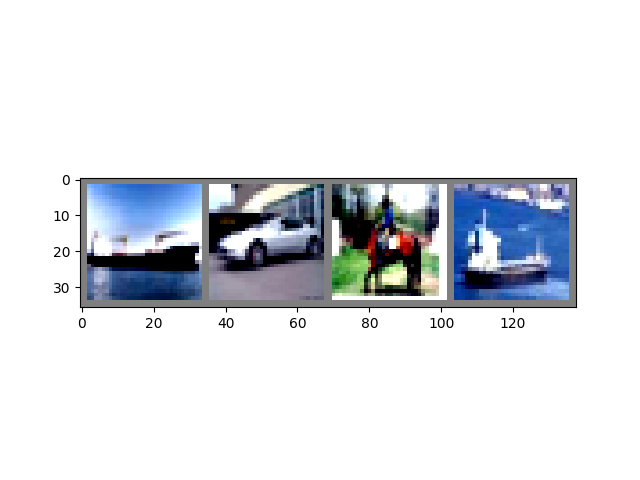
Clipping input data to the valid range for imshow with RGB data ([0..1] for floats or [0..255] for integers). Got range [-0.49473685..1.5632443].
 ship   car horse  ship
运行上面的单元格应该会显示一个包含四张图像的条带,以及每张图像的正确标签。
训练你的 PyTorch 模型#
请观看视频中从 17:10 开始的部分。
让我们把所有部分组合起来,训练一个模型。
#%matplotlib inline

import torch
import torch.nn as nn
import torch.nn.functional as F
import torch.optim as optim

import torchvision
import torchvision.transforms as transforms

import matplotlib
import matplotlib.pyplot as plt
import numpy as np
首先,我们需要训练集和测试集。如果你还没有,请运行下面的单元格以确保数据集已下载。(可能需要一分钟。)
transform = transforms.Compose(
    [transforms.ToTensor(),
     transforms.Normalize((0.5, 0.5, 0.5), (0.5, 0.5, 0.5))])

trainset = torchvision.datasets.CIFAR10(root='./data', train=True,
                                        download=True, transform=transform)
trainloader = torch.utils.data.DataLoader(trainset, batch_size=4,
                                          shuffle=True, num_workers=2)

testset = torchvision.datasets.CIFAR10(root='./data', train=False,
                                       download=True, transform=transform)
testloader = torch.utils.data.DataLoader(testset, batch_size=4,
                                         shuffle=False, num_workers=2)

classes = ('plane', 'car', 'bird', 'cat',
           'deer', 'dog', 'frog', 'horse', 'ship', 'truck')
我们将对来自 DataLoader 的输出进行检查。
import matplotlib.pyplot as plt
import numpy as np

# functions to show an image


def imshow(img):
    img = img / 2 + 0.5     # unnormalize
    npimg = img.numpy()
    plt.imshow(np.transpose(npimg, (1, 2, 0)))


# get some random training images
dataiter = iter(trainloader)
images, labels = next(dataiter)

# show images
imshow(torchvision.utils.make_grid(images))
# print labels
print(' '.join('%5s' % classes[labels[j]] for j in range(4)))
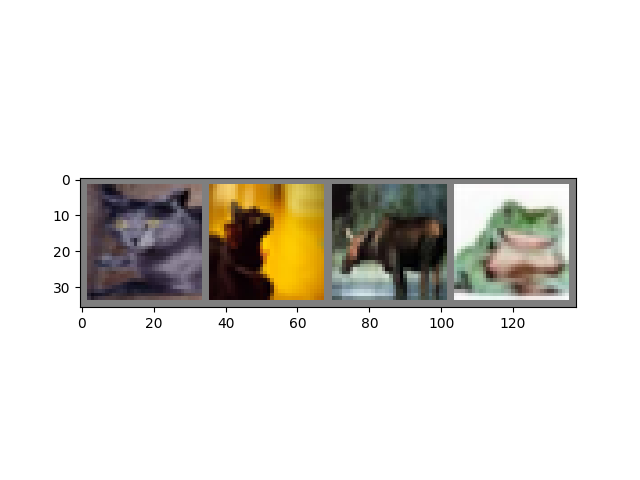
cat cat deer frog
这就是我们将要训练的模型。如果它看起来很熟悉,那是因为它是 LeNet 的一个变体——在本视频稍早讨论过——它被改编用于 3 色图像。
class Net(nn.Module):
    def __init__(self):
        super(Net, self).__init__()
        self.conv1 = nn.Conv2d(3, 6, 5)
        self.pool = nn.MaxPool2d(2, 2)
        self.conv2 = nn.Conv2d(6, 16, 5)
        self.fc1 = nn.Linear(16 * 5 * 5, 120)
        self.fc2 = nn.Linear(120, 84)
        self.fc3 = nn.Linear(84, 10)

    def forward(self, x):
        x = self.pool(F.relu(self.conv1(x)))
        x = self.pool(F.relu(self.conv2(x)))
        x = x.view(-1, 16 * 5 * 5)
        x = F.relu(self.fc1(x))
        x = F.relu(self.fc2(x))
        x = self.fc3(x)
        return x


net = Net()
我们需要的最后一些配料是一个损失函数和一个优化器。
criterion = nn.CrossEntropyLoss()
optimizer = optim.SGD(net.parameters(), lr=0.001, momentum=0.9)
损失函数,正如本视频前面讨论过的,是我们模型预测与理想输出之间差距的度量。交叉熵损失是我们这样的分类模型的典型损失函数。
优化器 是驱动学习的机制。在这里,我们创建了一个实现了*随机梯度下降*的优化器,这是更直接的优化算法之一。除了算法的参数,如学习率(lr)和动量,我们还传入了 net.parameters(),这是一个模型中所有学习权重的集合——也就是优化器调整的内容。
最后,所有这些都被组装到训练循环中。继续运行这个单元格,因为它可能需要几分钟才能执行。
for epoch in range(2):  # loop over the dataset multiple times

    running_loss = 0.0
    for i, data in enumerate(trainloader, 0):
        # get the inputs
        inputs, labels = data

        # zero the parameter gradients
        optimizer.zero_grad()

        # forward + backward + optimize
        outputs = net(inputs)
        loss = criterion(outputs, labels)
        loss.backward()
        optimizer.step()

        # print statistics
        running_loss += loss.item()
        if i % 2000 == 1999:    # print every 2000 mini-batches
            print('[%d, %5d] loss: %.3f' %
                  (epoch + 1, i + 1, running_loss / 2000))
            running_loss = 0.0

print('Finished Training')
[1,  2000] loss: 2.195
[1,  4000] loss: 1.879
[1,  6000] loss: 1.656
[1,  8000] loss: 1.576
[1, 10000] loss: 1.517
[1, 12000] loss: 1.461
[2,  2000] loss: 1.415
[2,  4000] loss: 1.368
[2,  6000] loss: 1.334
[2,  8000] loss: 1.327
[2, 10000] loss: 1.318
[2, 12000] loss: 1.261
Finished Training
在这里,我们只进行了 **2 个训练周期**(第 1 行)——也就是说,两次遍历训练数据集。每次遍历都有一个内部循环,该循环 **迭代训练数据**(第 4 行),提供转换后的输入图像及其正确标签的批次。
清零梯度(第 9 行)是一个重要的步骤。梯度会在一个批次上累积;如果我们不为每个批次重置它们,它们将继续累积,这将提供不正确的梯度值,使学习成为不可能。
在第 12 行,我们 **请求模型进行预测**。在下一行(第 13 行),我们计算损失——outputs(模型预测)和 labels(正确输出)之间的差异。
在第 14 行,我们进行 backward() 传播,并计算将指导学习的梯度。
在第 15 行,优化器执行一个学习步骤——它使用 backward() 调用中的梯度来微调学习权重,以它认为会减少损失的方向。
循环的其余部分对周期数、已完成的训练实例数以及训练循环中累积的损失进行一些简单的报告。
当你运行上面的单元格时, 你应该会看到类似这样的内容。
[1,  2000] loss: 2.235
[1,  4000] loss: 1.940
[1,  6000] loss: 1.713
[1,  8000] loss: 1.573
[1, 10000] loss: 1.507
[1, 12000] loss: 1.442
[2,  2000] loss: 1.378
[2,  4000] loss: 1.364
[2,  6000] loss: 1.349
[2,  8000] loss: 1.319
[2, 10000] loss: 1.284
[2, 12000] loss: 1.267
Finished Training
请注意,损失是单调下降的,这表明我们的模型在训练数据集上的性能持续提高。
作为最后一步,我们应该检查模型是否真的在进行*通用*学习,而不仅仅是“记忆”数据集。这称为**过拟合**,通常表明数据集太小(没有足够的示例进行通用学习),或者模型具有比其建模数据集所需的更多的学习参数。
这就是为什么数据集要分成训练集和测试集——为了测试模型的通用性,我们要求它对未训练过的数据进行预测。
correct = 0
total = 0
with torch.no_grad():
    for data in testloader:
        images, labels = data
        outputs = net(images)
        _, predicted = torch.max(outputs.data, 1)
        total += labels.size(0)
        correct += (predicted == labels).sum().item()

print('Accuracy of the network on the 10000 test images: %d %%' % (
    100 * correct / total))
Accuracy of the network on the 10000 test images: 54 %
如果你跟着做,你应该看到模型在这个时候大约有 50% 的准确率。这不算是最顶尖的水平,但比我们从随机输出预期的 10% 准确率要好得多。这表明模型确实发生了一些通用学习。
脚本总运行时间: (1 分钟 23.560 秒)